Integrating the Sugar 3D Text Effect into Professional Design Workflows
In the fast-paced world of digital content creation, visual hierarchy and aesthetic appeal often determine whether a message is noticed or ignored. For designers, marketers, and content creators, the pressure to produce high-quality graphics quickly is constant. This is where specialized assets like the Sugar 3D Text Effect become invaluable. Rather than spending hours modeling complex textures and lighting scenarios from scratch, professionals can leverage pre-built, editable templates to achieve polished results efficiently. This approach does not replace creative skill; instead, it optimizes the production pipeline, allowing creators to focus on strategy and composition rather than repetitive technical execution.
Understanding the Asset and Its Strategic Value
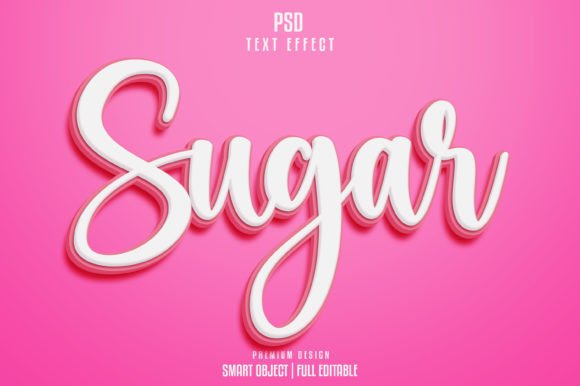
The Sugar 3D Text Effect is more than just a stylistic choice; it is a functional resource designed for immediate implementation. At its core, this graphic resource provides a high-fidelity, three-dimensional text style that mimics the granular, sweet texture of sugar. The template is delivered as a fully layered PSD file, operating at 300 DPI, which ensures that the output remains crisp and professional whether used for web banners or print materials. The dimensions, typically around 2000x1331 pixels, offer ample resolution for most standard marketing collateral.
For entrepreneurs and small business owners, understanding the value of such assets lies in time management. Creating a realistic 3D sugar effect manually requires advanced knowledge of lighting, shadow mapping, and texture overlay techniques in software like Adobe Photoshop. By utilizing a TEXT EFFECT TEMPLATE Editable PSD, users bypass the technical learning curve. The file is organized with smart objects, meaning the underlying structure remains intact while the surface content is easily swapped. This modularity is crucial for maintaining consistency across multiple projects without reinventing the wheel each time.
Workflow Integration: Before, During, and After Production
Integrating the Sugar 3D Text Effect into your workflow requires a shift in how you approach asset management. It is not merely a final touch but a component that influences earlier stages of planning.
Pre-Production and Planning
Before opening the file, consider the context in which the text will appear. The sugary aesthetic implies sweetness, indulgence, or playfulness. Therefore, it fits naturally into campaigns for bakeries, confectionery brands, lifestyle blogs, or seasonal promotions. During the planning phase, identify where this specific visual tone aligns with your brand voice. If you are a freelancer working with a client in the food industry, having this template ready allows you to present mockups rapidly during initial consultations. This speed can significantly impact client confidence and project acquisition.
Execution and Customization
During the design phase, the usability of the PSD file becomes paramount. The template utilizes smart objects, a feature that preserves the original data of an embedded layer. To apply the effect, you simply double-click the smart object thumbnail, paste your desired text or logo, and save. The main document updates automatically, applying the complex sugar texture, shadows, and highlights to your new content. This process ensures that the quality control standards are met every time, as the lighting and texture parameters are pre-calibrated by the template creator.
Because the file is well-layered and organized in groups, navigation is intuitive. Professionals often work under tight deadlines, and a chaotic file structure can lead to errors. A clean hierarchy allows for quick adjustments to color modes or background elements if the initial RGB settings need tweaking for specific display environments. The use of free fonts further enhances accessibility, ensuring that the design looks exactly as intended without requiring additional license purchases or font installations.
Post-Production and Deployment
Once the text is customized, the final step involves exporting the asset for its intended platform. Since the file is provided in RGB color mode, it is optimized for digital screens, including social media, websites, and email newsletters. However, the 300 DPI resolution means it can also be scaled down for high-quality print inserts if necessary. Before deployment, perform a final review to ensure the text legibility remains high against various backgrounds. The 3D nature of the effect creates depth, which can sometimes clash with busy background images. Using the layered structure, you can adjust the opacity or add subtle drop shadows to separate the text from the background, ensuring clarity.
Compatibility and Technical Considerations
To maximize the utility of the Sugar 3D Text Effect, it is essential to understand its technical requirements. The file format is PSD, which is native to Adobe Photoshop. While other image editing software may open PSD files, they often fail to interpret smart objects and layer styles correctly. Therefore, access to Adobe Photoshop is a prerequisite for full editability. This compatibility factor should be considered when collaborating with teams or clients. If you are handing off files to a partner who uses different software, you must export the final result as a PNG or JPEG with transparency if needed, rather than sharing the editable source file.
The reliance on smart objects also means that performance can vary based on your computer’s hardware. Rendering 3D effects and high-resolution textures requires sufficient RAM and processing power. For users with older systems, it is advisable to close unnecessary applications before working with the template to prevent lag. Additionally, because the template includes all necessary elements, there is no need to source external textures or brushes. This self-contained nature reduces the risk of missing links or broken assets, a common issue in collaborative workflows where files are shared across different directories.
Enhancing Brand Consistency and Efficiency
One of the most significant advantages of using a standardized template like this is the ability to maintain brand consistency. For marketers and social media managers, creating a cohesive visual identity across multiple posts is challenging. By establishing a set of go-to text effects, including the Sugar 3D style, you create a recognizable visual language. When audiences see this specific texture and depth, they begin to associate it with your brand’s playful or premium qualities.
Furthermore, efficiency gains compound over time. The initial investment in acquiring and organizing such templates pays dividends as you reuse them across different campaigns. Instead of starting from a blank canvas, you start from a proven foundation. This allows for rapid A/B testing of different headlines or calls to action. You can generate five variations of a promotional banner in the time it would traditionally take to design one from scratch. This agility is particularly valuable for small business owners and freelancers who must wear multiple hats and manage limited resources.
Practical Tips for Optimal Results
- Check Font Licensing: While the template uses free fonts, always verify the licensing terms if you plan to use the design for commercial purposes. If you substitute the font with a paid typeface, ensure you have the appropriate commercial license.
- Maintain Layer Organization: When adding your own elements to the PSD, keep the layer panel tidy. Name your layers clearly and group related items. This practice makes future edits easier, especially if you return to the file weeks or months later.
- Adjust Lighting for Context: The default lighting in the template is designed for a neutral background. If you place the text on a dark or colored background, you may need to tweak the layer styles slightly. Adjusting the inner shadow or highlight opacity can help the text integrate more naturally with its new environment.
- Export Settings: For web use, export your final design as a PNG-24 to preserve transparency and quality. For print, convert the color mode to CMYK and adjust the levels accordingly, keeping in mind that bright RGB colors may appear duller in print.
In conclusion, the Sugar 3D Text Effect is a powerful tool for modern creators who value both quality and efficiency. By understanding how to integrate this asset into your broader workflow, you can streamline your production process, maintain high visual standards, and deliver impactful designs consistently. Whether you are a seasoned designer looking to speed up your routine or a business owner aiming to elevate your marketing materials, leveraging such specialized templates is a strategic move toward more effective content creation.