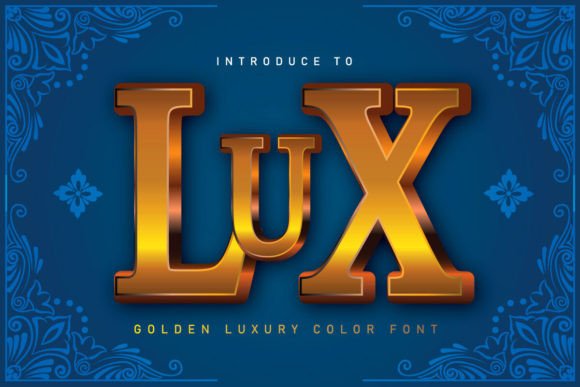
Mastering Luxury Branding with the Lux Golden Contemporary Font
In the competitive landscape of modern design, typography is more than just a vessel for text; it is the visual voice of your brand. For designers, marketers, and business owners aiming to convey opulence, exclusivity, and high-end quality, selecting the right typeface is critical. This is where Lux emerges as a transformative tool. As a golden contemporary color font, Lux bridges the gap between vintage luxury aesthetics and modern digital versatility. It offers a realistic 3D appearance with glossy, metallic finishes that instantly elevate any project from ordinary to extraordinary.
Whether you are crafting a high-impact poster, designing premium packaging, or creating a cohesive brand identity, understanding how to effectively implement Lux can significantly enhance your visual communication. This article explores the unique characteristics of this font, its practical applications, and the technical considerations necessary to ensure seamless integration into your workflow.
The Aesthetic Power of Vintage Luxury Meets Modern Design
The demand for "vintage luxury" in contemporary design has surged as consumers seek authenticity and heritage in the brands they support. However, achieving this look without appearing dated or cliché is a significant challenge for many creators. Lux addresses this need by combining classic serif structures with modern, hyper-realistic rendering. The font features a golden, glossy finish that mimics the reflection of light on actual metal, providing a depth and realism that flat colors simply cannot achieve.
This realistic 3D effect is not merely decorative; it serves a psychological purpose. Gold has long been associated with wealth, success, and prestige. By utilizing a font that inherently possesses these qualities, designers can subconsciously signal value to their audience. The glossy texture adds a tactile dimension to digital screens, making viewers feel as though they could reach out and touch the embossed lettering. This sensory engagement is crucial for capturing attention in an oversaturated media environment.
Practical Applications Across Industries
One of the strongest assets of Lux is its versatility. While it exudes sophistication, it is adaptable enough for a wide range of mediums. Here is how different industries can leverage this font to meet specific goals:
- Branding and Identity: For luxury boutiques, jewelry stores, or high-end consultancies, Lux can serve as the cornerstone of a logo. Its distinct character ensures immediate recognition and establishes a tone of exclusivity.
- Packaging Design: In retail, packaging is the first physical interaction a customer has with a product. Using Lux on boxes, labels, or bags creates an unboxing experience that feels premium and gift-worthy, encouraging social sharing and brand loyalty.
- Advertising and Banners: Digital ads require instant impact. The high-contrast nature of golden text against dark backgrounds makes Lux ideal for banners where readability and visual appeal must coexist. It draws the eye directly to the key message or call to action.
- Apparel and Merchandise: Fashion brands can use Lux for t-shirt graphics, hoodie prints, or accessory branding. The 3D aesthetic translates well to screen printing and embroidery simulations, adding perceived value to wearable items.
- Event Posters and Invitations: For galas, product launches, or exclusive parties, posters designed with Lux convey the importance of the event. It sets expectations for a high-quality experience before the guest even arrives.
Navigating Technical Compatibility: Black vs. Color Versions
While the visual appeal of Lux is undeniable, successful implementation requires a clear understanding of its technical specifications. A common pitfall for designers is assuming that all font files work universally across all software and hardware. Lux is available in two distinct versions, each suited for different workflows: the black version and the color version.
The Black Version: Ideal for Cutting Machines
If your project involves physical production using cutting machines, such as Cricut or Silhouette Cameo, the black version of Lux is your essential tool. This version is fully compatible with Cricut Design Space and other popular cutting software. It allows you to create precise vector cut lines for vinyl decals, heat transfers, and paper crafts. Because it is a solid color (black), it functions like any standard outline font, ensuring that your cutting machine can easily interpret the paths without confusion.
The Color Version: For Digital and Print Precision
The true magic of Lux lies in its color version, which contains the pre-rendered golden, glossy, and 3D effects. However, this complexity comes with compatibility restrictions. The color version is an OpenType-SVG font, which means it retains its color and gradient information only within specific design programs. It is compatible with industry-standard software such as Adobe Photoshop, Adobe Illustrator, Silhouette Studio (Business Edition), and Inkscape.
It is crucial to note that the OTF and TTF files of the color version are not compatible with Cricut Design Space. If you attempt to load the color file into Cricut, it will likely appear as a blank space or a solid block without the intended golden effect. Therefore, users must plan their workflow accordingly. If you are designing for digital display or professional offset printing, use the color version in Photoshop or Illustrator. If you are creating physical vinyl cuts, stick to the black version.
Tailoring Your Approach Based on User Needs
Different users will approach Lux with varying objectives, and understanding these perspectives can help maximize the font's potential.
For the Small Business Owner:
If you are a small business owner handling your own marketing, your primary goal is likely cost-effective professionalism. You may not have access to advanced design software. In this case, focus on the black version for physical products like stickers or signage using a Cricut. For digital social media posts, consider using free trials of compatible software like Inkscape to utilize the color version, ensuring your online presence matches the premium quality of your physical goods.
For the Professional Graphic Designer:
Professional designers often face tight deadlines and high client expectations. For you, Lux is a time-saving asset. Instead of spending hours manually creating gold textures, bevels, and shadows in Photoshop, you can type directly with Lux. This allows for rapid iteration and easy editing. Ensure you are working in Adobe Creative Cloud to take full advantage of the OpenType-SVG features, allowing you to scale the font without losing the crispness of the metallic details.
For the Hobbyist Crafter:
Crafters often enjoy the hands-on aspect of creation. If you are making custom wedding invitations or home decor, you might want the look of gold foil without the expense of hot foil stamping. Use the black version with gold vinyl on your cutting machine for a similar effect. Alternatively, if you have access to a printer capable of high-quality photo printing, use the color version in Silhouette Studio to print-and-cut projects that feature realistic metallic gradients.
Best Practices for Implementation
To get the most out of Lux, consider these practical recommendations:
- Contrast is Key: Golden text performs best against dark, rich backgrounds such as deep navy, charcoal, black, or emerald green. This contrast enhances the visibility of the glossy highlights and ensures legibility.
- Less is More: Because Lux is highly decorative and visually heavy, use it sparingly. It is most effective for headlines, logos, or short phrases. Avoid using it for long body text, as the intricate details can become difficult to read at smaller sizes.
- Check Your Software: Before purchasing or starting a project, verify that your design software supports OpenType-SVG fonts if you intend to use the color version. Refer to the Ultimate Font Guide provided by the creator for detailed installation instructions and troubleshooting tips.
- Layering Effects: In programs like Photoshop, you can layer the color font over textured backgrounds to add further depth. Experiment with blending modes to integrate the gold seamlessly into your overall composition.
In conclusion, Lux is more than just a font; it is a strategic design element that communicates value and sophistication. By understanding its dual nature—compatible with cutting machines in black and rich with detail in color—you can unlock its full potential across both digital and physical mediums. Whether you are refining a brand identity or creating a standout advertisement, Lux provides the golden touch needed to captivate your audience and elevate your creative output.